Unfold — flatten a curved board for CNC kerf cutting
What does this tool do?
Unfold takes a strip of curved faces on a board (for example a curved door just made with Bend) and flattens it into a flat 2D board, complete with the kerf lines a CNC needs — after cutting, the flat board is bent back into the original curve.
This is a Pro feature: if your account has no Pro plan, the plugin shows the upgrade dialog when you start the tool.
Use it when you need to:
- Make curved panels by kerf cutting then bending on a CNC.
- Generate a zigzag toolpath or pocket regions on the curved spans, plus rib lines that hold the shape.
- Place the flattened board right in the model, ready for nesting.
Basic steps
- Click the Unfold icon on the toolbar.
- Hover over one face of the curved board. The tool gathers the neighbouring faces within the angle threshold (default 60°) into a strip: the strip edges turn green and the face under the cursor (the seed face) gets an orange outline.
- Click to unfold. A flat 2D board (thickness from settings, default 17.5 mm) is created at the clicked spot, spreading both ways from the seed face, together with the kerf and hold-line groups.
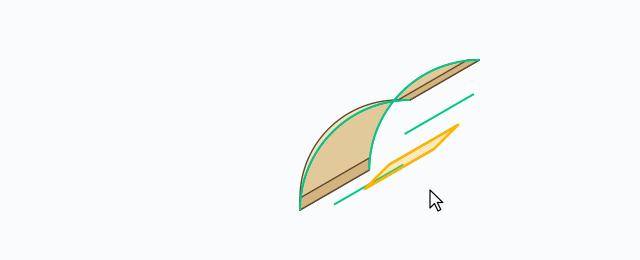
If the face strip forms a closed loop, the tool cuts the loop at a fold of 90° or more (or at the seed face). Press Esc to exit. Each unfold is one Undo step.
Two modes: ZIGZAG and POCKET
The pill row in the top-left corner picks the kerf mode:
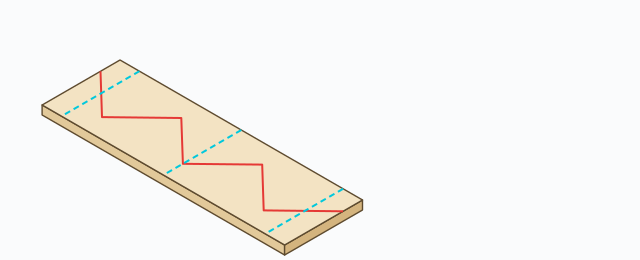
- ZIGZAG (default): builds a zigzag toolpath along the curved spans (group
ABF_BOUSTROPHEDON_PATH) plus hold lines across the strip so the part does not come loose while cutting (groupABF_HOLD). - POCKET: instead of a zigzag, the curved spans are pocketed (
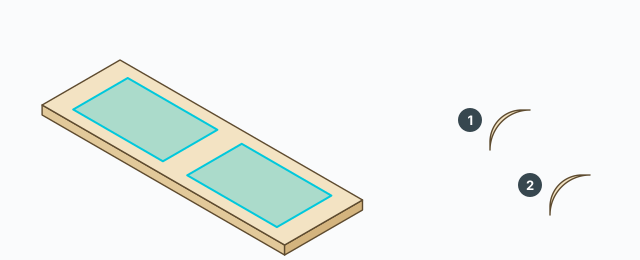
ABF_POCKETregions), and the remaining curved spans are split into their own groups (ABF_CURVED_1,ABF_CURVED_2…) with their own kerf and hold lines.
Ribs: Outer / Inner / Mid / Union
The checkbox row on the HUD toggles the rib lines drawn on the flat board to hold the curved shape when bending back:
- Outer, Inner, Mid — the outer, inner and middle rib lines (all on by default).
- Union (off by default) — merges the rib solids into one piece with outer shell; the merge is its own Undo step.
Settings (gear button)
Click the gear on the HUD to open the Unfold settings dialog, with sections for mode, ribs, parameters and group names. Notable values (in mm):
- Strip angle — default 60°: two neighbouring faces angled more than this end the strip.
- Tool diameter — default 6 mm; meat clearance 5 mm; kerf extend 3 mm; hold offset 2 mm.
- Board thickness of the flattened board — default 17.5 mm; thickness of the split curved segments — default 9 mm.
- Group names for each line kind (kerf, hold, pocket, curved segments) — change them if your shop uses different conventions.
Click Save to apply or Reset to return to the defaults.
Keyboard
- Click – unfold the strip under the preview.
- Esc – exit the tool.
Common problems
- The tool will not start: your account has no Pro plan.
- The preview does not spread over the whole curve: the angle between two neighbouring faces exceeds the strip angle (60°). Raise the threshold in settings, or split the board into smaller curved runs.
- Click does nothing: the strip has fewer than two adjacent faces, or the hovered face is not on a valid board.
- A warning says no kerf/pocket was produced: a curved span is too narrow for the tool diameter — check the tool diameter and meat clearance in settings.
- Rib union did not run: the rib geometry is too complex for outer shell; the flat board and kerf lines are still kept.