Precise scale — slide one side of a group or component
What it does
Precise scale slides one side of a group or component along one axis of its bounding box. The other side of the dividing plane stays put. It does not scale the whole solid: vertices on the handle's side move, vertices on the other side stay (unless two-end slide is on).
Select at least one group or component first. An empty selection, or a selection with neither, shows a message and the tool does not start.
The box, six handles, three mid planes
The bounding box is drawn cyan. Six circles sit at the centers of the six faces (there are no corner handles and no edge-midpoint handles). A circle is grey; under the cursor it is yellow; while dragging it is gold with a white rim.
Three planes pass through the box center: red along X, green along Y, blue along Z, each with a dashed outline set in from the box. That plane is the divider: vertices on one side of it will slide, vertices on the other side will not.
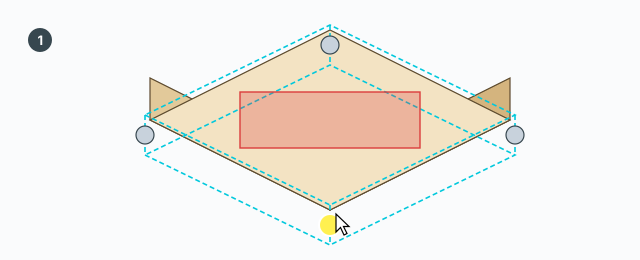
Drag a handle
- Hover a circle and click to grab it.
- Drag. The preview box changes; the model geometry does not yet. A red dimension line shows millimetres.
- Click again to commit and stay in the tool, so you can grab another handle.
While dragging, the tool snaps to an endpoint, a midpoint, an edge, a guide line, a guide point, or a world X/Y/Z axis. It does not snap to a face or to empty space.
When the drag starts, the selected groups and components (including nested ones) are made unique, so other copies in the model are not edited. If you release with a zero distance, that step is aborted and the make-unique is undone with it.
A nested group or component that lies entirely on one side of the divider is translated as a whole. Vertices on the handle's side slide along the axis; the other side stays. A component whose definition is still shared is translated rigidly when the whole of it is on the moving side; one that straddles the divider is left where it is.
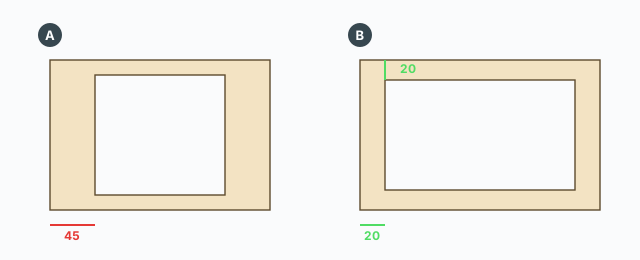
Each commit is one undo step named Precise Scale. Typing a number and pressing Enter commits and leaves the tool. A click commits and the tool stays.
Ctrl — slide both ends
Ctrl toggles (each press, not a hold). When it is on, both ends of the axis slide out or in. Three black dashed lines join each pair of opposite handles; they are always drawn.
Tab — what the number means, only while dragging a handle
Tab cycles two measurements. The red line and the VCB number follow:
- The one you start on: how far the handle has travelled, from its old position to the preview.
- After one Tab: the distance between the face you are moving and the opposite face. That opposite face is filled yellow. If Ctrl is on, both ends are included in that span.
Another Tab returns to the travel distance.
Typing a number
The VCB accepts a number only while you are dragging. Type it and press Enter. A leading + or - does not add or subtract: the tool uses the absolute value. The direction is whichever way you are already dragging.
- On the travel measurement: the number is how many millimetres the handle will move.
50,+50, and-50are all a 50 mm move along the current drag. - After Tab (measure to the opposite face): the number is the size you want between the two faces, in millimetres. With Ctrl on, both ends share the change so the span becomes that size.
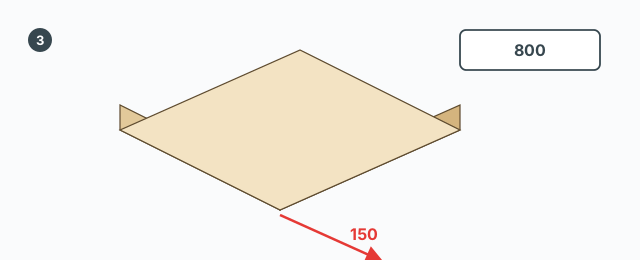
Enter commits and leaves the tool.
Mid planes — move the divider
Click a coloured mid plane (or its dashed outline) and drag: the divider moves along its own axis. The model geometry does not change. The divider only decides, for the next handle drag in this same tool session, which side slides.
- Click again: the divider stays at the new place and the tool stays open.
- Esc while dragging a mid plane: the divider goes back and the tool stays open.
- A typed number is the divider's distance from the box center, in millimetres, clamped so it stays inside the box. The tool then closes. The divider exists only inside the tool session, so that number does not edit the model and is gone the next time you open the tool.
Hover an edge or a face that belongs to the selection (orange outline) and click: the box axes follow that edge, or that face's normal, so the handles are not stuck to the world axes. An edge or face outside the selection is ignored.
Esc
- While dragging a handle: cancel the drag (including that drag's make-unique) and stay in the tool.
- While dragging a mid plane: put the divider back and stay in the tool.
- When nothing is dragging: leave the tool.
Keys
- Click a handle — start the drag; click again — commit and stay.
- Click an edge or face of the selection — orient the box axes.
- Click a mid plane — move the divider.
- Ctrl — toggle sliding both ends.
- Tab while dragging a handle — switch between travel and size-to-opposite.
- A number + Enter while dragging a handle — millimetres for the current measurement, direction from the cursor; then the tool closes.
- Esc — cancel the drag, or leave if nothing is dragging.