Layer manager — show, color, highlight, and focus tags

What it does

Layer manager opens the Layer Manager dialog. The list is the tags on the selection (including inside groups), otherwise the tags in the active edit context, otherwise every tag in the model. If there are none, the dialog does not open and a message says no layers/tags were found.

The toolbar tooltip is: focus, highlight, color, and delete by layer/tag.

The tag table

Each row is a tag. Columns: select, eye (visible), Tag name, Color, highlight, Focus, Actions.

  • The eye toggles whether the tag is visible. That is undoable.
  • Click the name to select the groups and components that carry that tag.
  • The color well sets the tag's color in SketchUp. That is undoable.
  • The highlight bulb draws a frame around faces and edges on that tag, in the tag's own color. The frames are drawn only while X-Mode is on.
  • The Focus check hides top-level groups and components that do not carry the focused tags, and turns X-ray on. It does not use the Tags panel Isolate command.
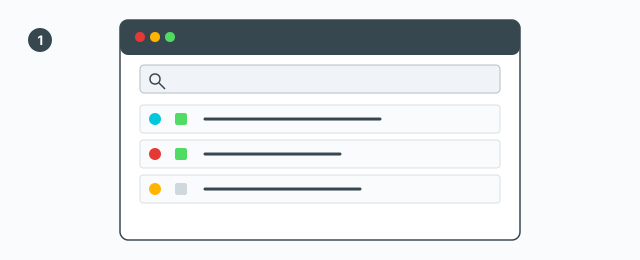
Layer Manager: tag list, eye, color, highlight, Focus

Show-all lists every tag in the model without changing the selection. The search box runs on Enter or the search button. The save button beside the box creates a tag from the search text, after a confirm.

X-Mode

X-Mode (color by tag) turns on color-by-tag and X-ray. Highlight frames show only while X-Mode is on. A separate button reactivates the highlight tool if it was turned off. Closing the dialog restores the session's X-Mode and focus; if you are signed in, the settings are pushed.
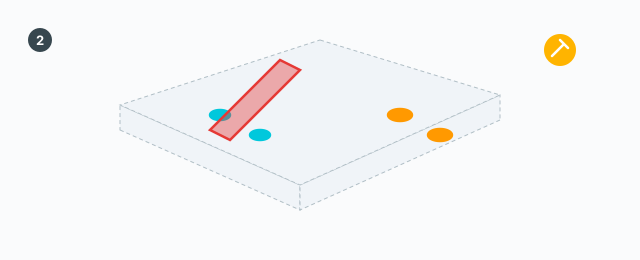
X-Mode on: highlight frames use each tag's own color

Focus

Tick Focus on one or more tags. Top-level groups and components that do not carry those tags are hidden, X-ray turns on, and the tag colors are applied. Untick to show them again. That hide and show is undoable. The default Untagged / Layer0 tag cannot be removed; a bulk highlight skips it too.
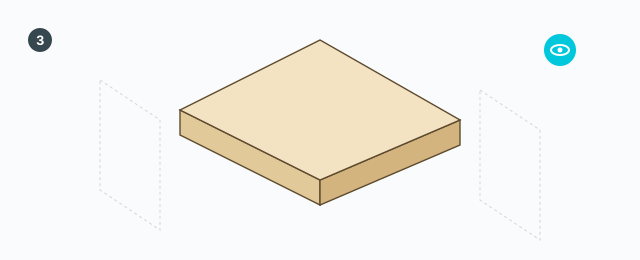
Focus: objects that do not carry the tag are hidden; the rest stay, with X-ray

Delete

  • Delete the selected tags — a confirm, then the tags are removed.
  • Delete entities on all filtered tags — geometry on those tags is deleted.
  • On a row: assign the tag, remove the tag, or delete entities on the tag. Each asks first and is one undo step.

Color, visibility, focus, assign, and delete are undoable. Highlight frames and the X-Mode flag are view state, not geometry you undo.

Keys

Enter in the search box runs the search. The dialog has no other shortcuts.


0 bình luận

Đăng nhập để bình luận

Danh sách video

Explode → Groups — convert components to plain groups
ABF Extra Label — arrow and board number
Rotate Label — turn the board label 90°
Flip Label — move the label to the other face
Find Nesting Parts — locate a board on the sheets
Nesting Editor — move parts, re-pack, and set cut order
ABF Extra Nesting — pack labelled boards onto sheets
Generate G-code — toolpaths on the nesting
Export Nesting DXF — one file per sheet
CNC relief circles — round a concave corner
Tenon helper — tenons and mortises where boards touch
Cam Lock — drill marks for cams, screws and dowels
Unsolid Trim — cut one solid with another, keep the labels
Unsolid Outer Shell — merge solids into one shell
Intersection Mark — stamp the section where boards meet
Solid Inspector — find holes and stray edges
Bend — round a square corner into an arc
Unfold — flatten a curved board for CNC kerf cutting
Cross halving join — mark half-lap regions where boards cross
CNC marking — a cut line or a pocket on a face
Edge banding — mark a board's side faces
Isolate selection — hide everything else
Deep Push — push a face from outside the object
Move Vertices — drag board corners by exact mm
Make Face — skin every closed edge loop
Draw board — a finished board from two corners
Contour — turn a drawn line into a solid strip
Pen Curve — draw and edit Bézier curves
Align — snap a group or component onto a face, edge, or point
Mirror — reflect across a face plane or along an edge
Rotate — turn the selection 90° about X, Y, or Z
Trim Side Faces — inset a board's outer side faces
Precise scale — slide one side of a group or component
Cross Cut — split a group or component across one edge
Layer manager — show, color, highlight, and focus tags
Component Inventory — tally parts, hardware, edge band, and prices
Label Print — print labels for boards in the nesting
Warehouse — local models, V-Ray materials, and assets
Settings — account, nesting, and toolbar
Color — select every object that uses the picked material
Remove Color — clear materials on the selection
Dumb Scale — set the world width, depth, or height of the selection
Hover dimensions — width, depth, and height on the object under the cursor
Instance Rename — rename the selected groups and components